
Table of Contents
- Introduction
- The Decision Framework
- Model 1: Database-per-Tenant
- Model 2: Schema-per-Tenant
- Model 3: Shared Tables with Tenant ID
- Decision Matrix
- Hybrid Approaches
- Performance Benchmarks
- Summary
- Further Reading
Introduction
In Part 1, we introduced the three fundamental multi-tenancy models: database-per-tenant, schema-per-tenant, and shared tables. But knowing what they are isn’t the same as knowing when to use each one.
This post dives deep into the practical trade-offs, giving you a decision framework based on real-world constraints like tenant count, compliance requirements, and operational complexity.
The Decision Framework
Before comparing models, let’s establish the key dimensions that should drive your decision:
| Dimension | Question to Ask |
|---|---|
| Tenant Count | How many tenants do you expect at scale? |
| Isolation Requirements | What level of data separation is required? |
| Compliance Needs | Do you need SOC2, HIPAA, GDPR, or similar? |
| Operational Complexity | How much infrastructure can your team manage? |
| Query Patterns | Do you need cross-tenant analytics? |
| Resource Fairness | How critical is preventing noisy neighbors? |
Let’s examine how each model performs across these dimensions.
Model 1: Database-per-Tenant
When It Shines
Database-per-tenant is the gold standard for enterprise SaaS where customers demand—and pay for—complete isolation.
-- Each tenant has their own database-- Connection string per tenant:-- postgresql://user:pass@host:5432/tenant_acme-- postgresql://user:pass@host:5432/tenant_globex
-- Within tenant_acme database:CREATE TABLE users (    id UUID PRIMARY KEY DEFAULT gen_random_uuid(),    email TEXT UNIQUE NOT NULL,    name TEXT);
-- No tenant_id needed - isolation is physical
Real-World Use Cases
- Healthcare SaaS: HIPAA requires demonstrable data isolation
- Financial Services: SOC2 Type II audits are simpler with physical separation
- Enterprise Contracts: Large customers often mandate dedicated infrastructure
- Multi-Region Deployments: Place tenant databases in specific geographic regions
The Connection Challenge
The biggest operational hurdle is connection management. Each database needs its own connection pool:
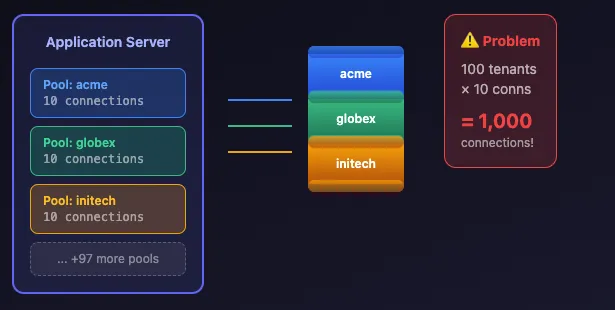
With 100 tenants and 10 connections per pool, you’re managing 1,000 connections. PostgreSQL’s default max_connections is 100. You’ll need:
- PgBouncer in transaction mode (covered in Part 4)
- Connection multiplexing at the application layer
- Dynamic pool creation for infrequently accessed tenants
Migration Complexity
Every schema change must run against every database:
#!/bin/bash# migrate_all.sh - Run migrations across all tenant databases
TENANTS=$(psql -h localhost -U admin -d master -t -c \  "SELECT database_name FROM tenants WHERE active = true")
for tenant_db in $TENANTS; do  echo "Migrating $tenant_db..."  psql -h localhost -U admin -d "$tenant_db" -f migration_001.sql
  if [ $? -ne 0 ]; then    echo "FAILED: $tenant_db"    exit 1  fidone
This approach has risks:
- Partial migration states if one database fails
- Long deployment windows with many tenants
- Need for migration tracking per database
Verdict
| Criteria | Score | Notes |
|---|---|---|
| Isolation | ★★★★★ | Physical separation, impossible to leak |
| Scalability | ★★☆☆☆ | Practical limit ~100-500 tenants |
| Operations | ★★☆☆☆ | High complexity, many moving parts |
| Compliance | ★★★★★ | Easiest to audit and certify |
| Analytics | ★☆☆☆☆ | Cross-tenant queries require federation |
Choose this when: You have fewer than 500 tenants, enterprise customers requiring isolation, or strict compliance mandates.
Model 2: Schema-per-Tenant
The Middle Ground
Schema-per-tenant offers logical isolation without the connection overhead of separate databases:
-- Create schema for new tenantCREATE SCHEMA tenant_acme;
-- Create tables within the schemaCREATE TABLE tenant_acme.users (    id UUID PRIMARY KEY DEFAULT gen_random_uuid(),    email TEXT UNIQUE NOT NULL,    name TEXT);
CREATE TABLE tenant_acme.orders (    id UUID PRIMARY KEY DEFAULT gen_random_uuid(),    user_id UUID REFERENCES tenant_acme.users(id),    total NUMERIC(10,2));
-- Switch context with search_pathSET search_path TO tenant_acme, public;
-- Now queries automatically use tenant_acme schemaSELECT * FROM users; -- Reads from tenant_acme.users
Dynamic Schema Routing
Your application needs to set the schema context on each request:
-- At the start of each request, set the tenant context-- Option 1: SET search_pathSET search_path TO tenant_acme, public;
-- Option 2: Use fully qualified namesSELECT * FROM tenant_acme.users WHERE id = $1;
-- Option 3: Set via connection parameter-- postgresql://user:pass@host/saas_app?options=-c%20search_path%3Dtenant_acme
The Catalog Bloat Problem
PostgreSQL stores schema metadata in system catalogs. With thousands of schemas, each containing dozens of tables, the catalog grows significantly:
-- Check catalog sizeSELECT    nspname AS schema_name,    COUNT(*) AS table_countFROM pg_class cJOIN pg_namespace n ON c.relnamespace = n.oidWHERE n.nspname LIKE 'tenant_%'GROUP BY nspnameORDER BY table_count DESC;
-- Monitor catalog table sizesSELECT    relname,    pg_size_pretty(pg_relation_size(oid)) AS sizeFROM pg_classWHERE relname IN ('pg_class', 'pg_attribute', 'pg_index', 'pg_constraint')ORDER BY pg_relation_size(oid) DESC;
At scale (10,000+ schemas), you may notice:
- Slower
CREATE TABLEoperations - Increased memory usage for catalog caching
- Longer
pg_dumptimes
Migration Strategy
Migrations are simpler than database-per-tenant but still require iteration:
-- migration_001.sql-- Add column to all tenant schemas
DO $$DECLARE    schema_name TEXT;BEGIN    FOR schema_name IN        SELECT nspname FROM pg_namespace        WHERE nspname LIKE 'tenant_%'    LOOP        EXECUTE format(            'ALTER TABLE %I.users ADD COLUMN IF NOT EXISTS avatar_url TEXT',            schema_name        );    END LOOP;END $$;
Verdict
| Criteria | Score | Notes |
|---|---|---|
| Isolation | ★★★★☆ | Logical separation, schema boundaries |
| Scalability | ★★★☆☆ | Works to ~1,000-10,000 tenants |
| Operations | ★★★☆☆ | Moderate complexity |
| Compliance | ★★★★☆ | Good for most requirements |
| Analytics | ★★☆☆☆ | Requires UNION across schemas |
Choose this when: You have 100-10,000 tenants, need logical separation, and want simpler connection management than database-per-tenant.
Model 3: Shared Tables with Tenant ID
Maximum Efficiency
Shared tables with a tenant_id column is the most resource-efficient approach:
CREATE TABLE users (    id UUID PRIMARY KEY DEFAULT gen_random_uuid(),    tenant_id UUID NOT NULL REFERENCES tenants(id),    email TEXT NOT NULL,    name TEXT,    created_at TIMESTAMPTZ DEFAULT now(),
    UNIQUE(tenant_id, email));
CREATE TABLE orders (    id UUID PRIMARY KEY DEFAULT gen_random_uuid(),    tenant_id UUID NOT NULL REFERENCES tenants(id),    user_id UUID NOT NULL,    total NUMERIC(10,2),    created_at TIMESTAMPTZ DEFAULT now());
-- Critical: Index for tenant-scoped queriesCREATE INDEX idx_users_tenant ON users(tenant_id);CREATE INDEX idx_orders_tenant ON orders(tenant_id);CREATE INDEX idx_orders_tenant_user ON orders(tenant_id, user_id);
The Isolation Risk
Without additional safeguards, a single bug can expose data across tenants:
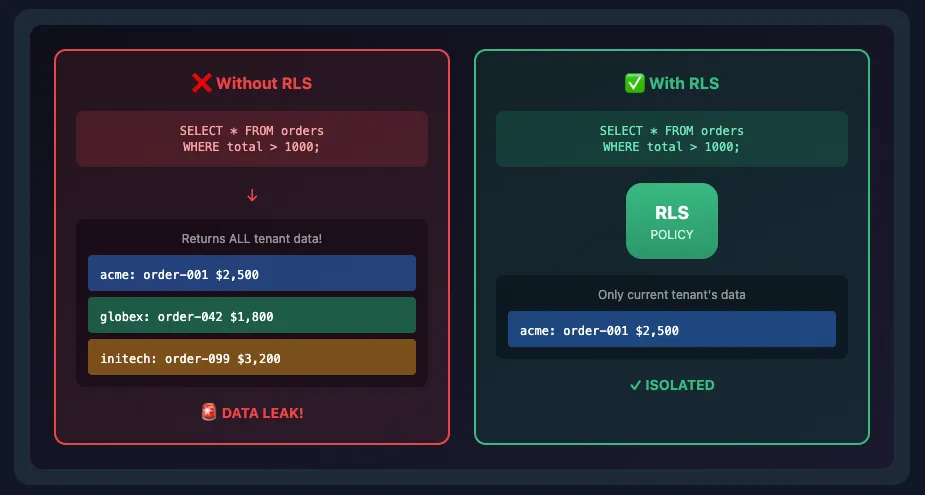
This is where Row-Level Security becomes essential (covered in Part 3):
-- Enable RLSALTER TABLE orders ENABLE ROW LEVEL SECURITY;
-- Policy ensures queries are always tenant-scopedCREATE POLICY tenant_isolation ON orders    USING (tenant_id = current_setting('app.current_tenant')::UUID);
-- Now even if code forgets the filter, RLS enforces itSET app.current_tenant = 'tenant-uuid-here';SELECT * FROM orders WHERE total > 1000;-- Only returns orders for the current tenant
Query Performance
With proper indexing, shared tables perform excellently:
-- Composite index for common query patternCREATE INDEX idx_orders_tenant_created    ON orders(tenant_id, created_at DESC);
-- Query plan shows efficient index scanEXPLAIN ANALYZESELECT * FROM ordersWHERE tenant_id = 'abc-123'ORDER BY created_at DESCLIMIT 20;
-- Index Scan using idx_orders_tenant_created on orders--   Index Cond: (tenant_id = 'abc-123'::uuid)--   Rows Removed by Filter: 0--   Planning Time: 0.1ms--   Execution Time: 0.5ms
Cross-Tenant Analytics
Unlike other models, analytics are straightforward:
-- Revenue by tenant (easy!)SELECT    t.name AS tenant_name,    COUNT(o.id) AS order_count,    SUM(o.total) AS revenueFROM tenants tLEFT JOIN orders o ON o.tenant_id = t.idWHERE o.created_at >= NOW() - INTERVAL '30 days'GROUP BY t.id, t.nameORDER BY revenue DESC;
-- Active users across all tenantsSELECT    DATE_TRUNC('day', last_login) AS day,    COUNT(DISTINCT id) AS active_usersFROM usersWHERE last_login >= NOW() - INTERVAL '7 days'GROUP BY 1ORDER BY 1;
Verdict
| Criteria | Score | Notes |
|---|---|---|
| Isolation | ★★★☆☆ | Requires RLS for safety |
| Scalability | ★★★★★ | Handles millions of tenants |
| Operations | ★★★★★ | Simplest to manage |
| Compliance | ★★★☆☆ | RLS satisfies most auditors |
| Analytics | ★★★★★ | Native cross-tenant queries |
Choose this when: You expect high tenant counts, need simple operations, and can implement RLS properly.
Decision Matrix
Visual decision tree for choosing the right multi-tenancy approach
Here’s a practical decision tree:
┌─────────────────────────┐ │ How many tenants do │ │ you expect at scale? │ └───────────┬─────────────┘ │ ┌───────────────────┼───────────────────┐ │ │ │ ▼ ▼ ▼ < 500 500 - 10,000 > 10,000 │ │ │ ▼ ▼ ▼ ┌────────────────┐ ┌────────────────┐ ┌────────────────┐ │ Do enterprise │ │ Need physical │ │ Shared Tables │ │ customers need │ │ backup per │ │ + RLS │ │ isolation? │ │ tenant? │ │ │ └───────┬────────┘ └───────┬────────┘ └────────────────┘ │ │ ┌─────┴─────┐ ┌─────┴─────┐ │ │ │ │ ▼ ▼ ▼ ▼ Yes No Yes No │ │ │ │ ▼ ▼ ▼ ▼ Database Schema Schema Shared per-tenant per- per- Tables tenant tenant + RLSHybrid Approaches
In practice, many SaaS applications use hybrid models:
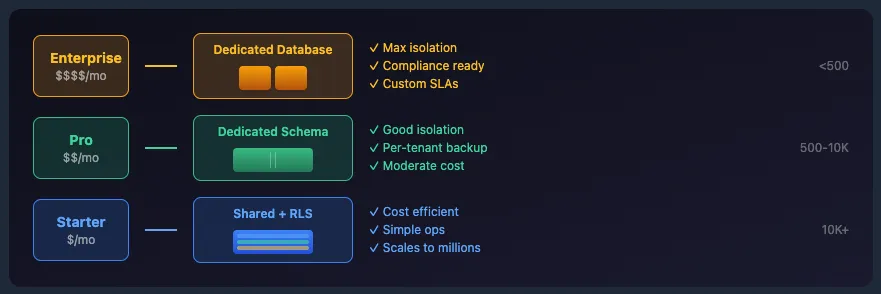
Tiered Isolation
-- Tenants table tracks isolation levelCREATE TABLE tenants ( id UUID PRIMARY KEY, name TEXT NOT NULL, plan TEXT NOT NULL, -- 'starter', 'pro', 'enterprise' isolation_level TEXT NOT NULL DEFAULT 'shared', -- 'shared' = shared tables -- 'schema' = dedicated schema -- 'database' = dedicated database dedicated_db_name TEXT, -- Only for 'database' level dedicated_schema TEXT -- Only for 'schema' level);Your application routes queries based on isolation level:
def get_connection(tenant_id: str):    tenant = get_tenant(tenant_id)
    if tenant.isolation_level == 'database':        return get_dedicated_db_connection(tenant.dedicated_db_name)    elif tenant.isolation_level == 'schema':        conn = get_shared_db_connection()        conn.execute(f"SET search_path TO {tenant.dedicated_schema}, public")        return conn    else:        conn = get_shared_db_connection()        conn.execute(f"SET app.current_tenant = '{tenant_id}'")        return conn
Migration Path
Start with shared tables, graduate tenants as needed:
- Launch with shared tables + RLS (fastest to market)
- Upgrade enterprise customers to dedicated schemas
- Isolate high-compliance customers to dedicated databases
This gives you the best of all worlds: rapid iteration for most tenants, premium isolation for those who need it.
Performance Benchmarks
Here’s what to expect at different scales (based on a typical SaaS workload):
| Model | 100 Tenants | 1,000 Tenants | 10,000 Tenants |
|---|---|---|---|
| Database-per-tenant | ✅ Works well | ⚠️ Connection pressure | ❌ Impractical |
| Schema-per-tenant | ✅ Works well | ✅ Works well | ⚠️ Catalog bloat |
| Shared tables + RLS | ✅ Works well | ✅ Works well | ✅ Works well |
Memory overhead per model (approximate):
- Database-per-tenant: ~10-50MB per database (shared buffers, etc.)
- Schema-per-tenant: ~1-5MB per schema (catalog entries)
- Shared tables: Negligible per-tenant overhead
Summary
| Model | Best For | Avoid When |
|---|---|---|
| Database-per-tenant | Enterprise, compliance-heavy | High tenant counts |
| Schema-per-tenant | Mid-market, logical separation | 10,000+ tenants |
| Shared tables + RLS | High-scale, operational simplicity | Cannot implement RLS properly |
The modern default for most SaaS applications is shared tables with Row-Level Security. It scales effortlessly, simplifies operations, and with RLS, provides isolation guarantees that satisfy most compliance requirements.
In the next post, we’ll implement Row-Level Security from scratch, showing you exactly how to make shared tables as secure as physical isolation.